
 Maya
Maya ZBrush
 Houdini
 Substance Painter
 Blender
 Nuke
Nuke Arnold
 KeyShot
 V-Ray
V-Ray Substance Designer
 Mari
Mari Marvelous Designer
 Marmoset Toolbag
 3ds Max
 3DCoat
 Redshift
 After Effects
 Faceform Wrap
 Lightroom
 OctaneRender
 SpeedTree
 Daz 3D
 Agisoft Metashape
 Fusion
 Modo
Modo RealityCapture
 Gaea
Gaea Cinema 4D
 Gravity Sketch
 Premiere
 Procreate
 Substance 3D Modeler
 Katana
 Mudbox
 Krita
Krita World Creator
 Yeti
Yeti Ziva VFX
 SketchBook
 Quixel DDO
 Mixamo
 Natron
 Quixel Bridge
 Quixel Megascans
 Adobe Medium
 Quixel Mixer
 SynthEyes
 Clip Studio Paint
 SketchUp
 Unity
Unity Gaffer
 Massive
 Materialize
 Ornatrix
 PreForm
 Corel Painter
 Moi 3D
 QuickTime
 Storyboard Pro
 TreeIt
 animBot
 ReCap
ReCap Meshmixer
 DaVinci Resolve
 World Machine
 xNormal








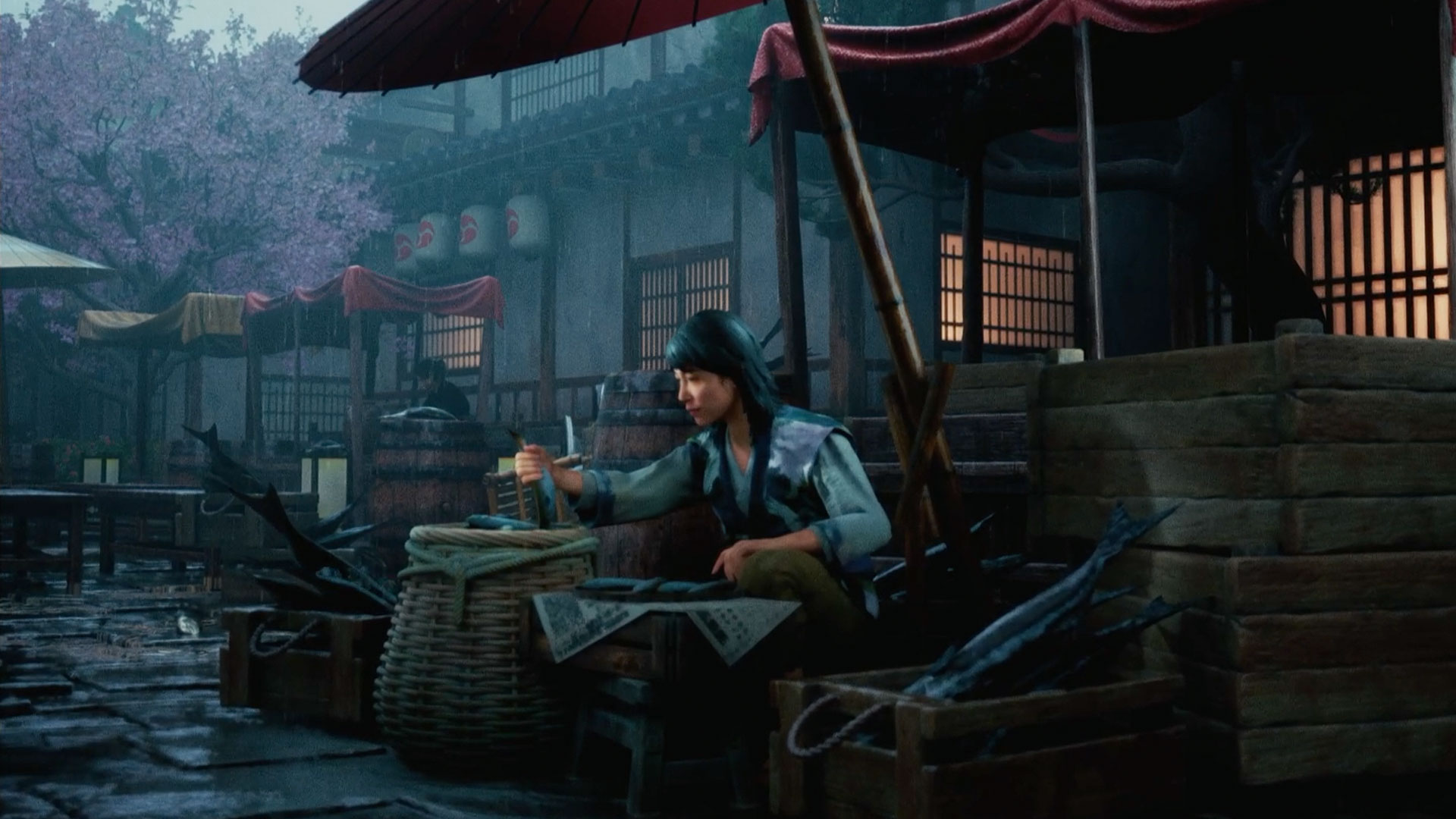


This 30-minute workshop offers a comprehensive breakdown of Ted Mebratu’s tried-and-tested workflow for quickly achieving an atmospheric rainy lighting scenario in Unreal Engine with Ultra Dynamic Sky. Ted guides artists through every step of the process, starting from scratch, to achieve the final look.
The workshop begins with the global setup, going over cloud coverage, fog density, and how to balance the Sky Light against the Directional Light to get a proper overcast read, before dialing in the exposure and color in a Post Process Volume so it sits right under Lumen. From there, Ted breaks down his thought process for setting up the character's lighting. Since the character is lit by an overcast sky, he explains how to add shape back in with a few Rect Light and Point Light fills that serve as ambient bounce without flattening the diffused look.
Ted also showcases various tools and techniques he uses to enhance the weather, such as rain drip splines for runoff, puddle volumes for placing standing water, and material integration that handles wetness, darkening, and roughness across the assets. In his experience, it’s these little details that sell the rain more than the falling particles do. To complete the tutorial, he reveals the settings he uses to export a sharp 8k 16-bit EXR render from the Movie Render Queue.
This short workshop is intended for intermediate to advanced artists who already have a general understanding of how lighting works in Unreal Engine 5. By completing this workshop, artists should have gained practical takeaways and techniques from Ted’s workflow to enhance their personal and professional work.
4 Lessons
The first lesson in Ted Mebratu's 30-minute workshop demonstrates his methodical approach to cinematic lighting in Unreal Engine, emphasizing the importance of a controlled, dim base lighting setup to maximize creative flexibility with local light sources. By combining UltraDynamicSky's volumetric cloud and fog tools with careful post-process settings, artists can learn how to achieve a highly atmospheric and believable scene. Ted also explains why intentional restraint in global lighting will lead to greater artistic control over the final composition.
Duration: 5m 39s

This lesson demonstrates practical techniques for creating a convincing rain scene using Ultra Dynamic Weather tools in Unreal Engine, balancing technical settings with artistic choices. Ted demonstrates how to layer multiple effects — splashes, drips, and puddles — to build depth and realism. He closes out this lesson by setting up a deeper dive into the scene's lighting setup.
Duration: 3m 24s

This lesson provides a comprehensive breakdown that covers both lighting strategy and advanced material techniques. Ted explains why working from broad, atmospheric elements down to fine detail ensures every element serves a specific visual purpose. By combining thoughtful light layering with dynamic weather material functions, he shows how to achieve a cohesive, realistic, and highly controllable scene.
Duration: 10m 27s

The final lesson provides a practical, step-by-step walkthrough for rendering high-quality 8K stills in Unreal Engine using Movie Render Queue. Ted discusses how to balance render quality and system performance through smart settings such as tiling, spatial sampling, and proper particle warm-up. His workflow serves as a solid foundation for artists looking to produce polished, artifact-free renders for portfolio or production use.
Duration: 5m 33s

Primary tools
For this workshop you’ll need:


* Note that these programs and materials will not be supplied with the course.
Skills Covered
Who’s this Workshop for?
Learning Outcomes
By completing this workshop, artists will learn how to create a realistic rainy scene in Unreal Engine 5 using the Ultra Dynamic Sky.
Key skills include:
- How to understand and use effective cinematic shot lighting workflows and methods to create realistic results.
- How to quickly prototype weather looks in Unreal Engine 5 using the Ultra Dynamic Sky's intuitive toolset.
- How to sync an Unreal environment's materials to the weather system for a cohesive weather look.


